 UAC is a new feature implemented in Windows Vista to increase security. While I would highly recommend having it enabled, some people believe it is annoying and want to disable it. Click Read more to find out how to disable it.
Monday, July 28, 2008
How to Disable UAC in Vista
UAC is a new feature implemented in Windows Vista to increase security. While I would highly recommend having it enabled, some people believe it is annoying and want to disable it. Click Read more to find out how to disable it.
FREE Antivirus!
 Nowadays you can not get by without antivirus software on your PC. Many people do not know there is a large amount of antivirus software to choose from, and many of them free! Click read more to find out more!
Sunday, July 27, 2008
How to Change the Location of the Documents and other user Folders
 Windows sets the location of the Documents, Music, Pictures, and other similar folders inside of the users directory by default. While this is fine in most cases, some times it is better to move the folder. An example would be if you installed a second hard drive in your computer and wish to put more files in those folders then your original drive could hold. If you simply moved the folder to the new location, Windows wouldn't know and would still try to access the old location when you click the Documents icon. Click Read more to see how to change the location of these folders to anywhere else on your PC.
Increase The Amount of Recent Programs Shown in the Start Menu
 The Windows Start Menu displays the most recently used programs depending on how often a program is launched. The list by default is very small and may not contain very many of your programs. There is plenty of room on the screen to show more programs. Click read more to find out how to increase the amount of recently used programs shown!
Wednesday, June 27, 2007
How to hide users in Windows
 Windows will automatically show all user accounts on the welcome screen with no easy option to disable this. You may want to have a hidden one that no one knows about, and using this tutorial, you will learn how to hide a user account from the welcome screen. Click Read More to see how!
Sunday, March 11, 2007
Enable Hidden BootScreen in Windows Vista
 The Vista boot screen is very plain and dull but Microsoft has a nicer boot screen hidden in Vista that is not enabled by default. I do not know why this was not put as the boot screen, as it looks much nicer. You can manually enable it very easily. Click Read more to see how!
How to change the power button in Vista to shut down your PC.
 If you do not like to put your computer to sleep or would just rather have the power button in the Vista Start Menu shut down your computer you can follow this simple guide. Click Read more to see how!
Thursday, March 01, 2007
How to keep files across multiple computers in sync!
 Microsoft SyncToy is a PowerToy for Windows XP and Vista that allows you to keep folders in sync! They can be on the same drive, on different drives, or even on different computers!
Click "Read more!" to see how!
Wednesday, February 07, 2007
Use Windows Vista Photo Gallery in full resolution!

As many people have noticed with Vista, if you do not have an experience rating of at least 5 then Windows Photo Gallery will not run slideshows at high resolutions. This can be a problem, especially for LCD owners because it will not run at the native resolution causing the quality of the slideshow to be heavily degraded. Fortunately, there is a simple fix that requires a little bit of registry editing. Click read more to see how!
Saturday, February 03, 2007
Extend Vista grace period up to 120 days
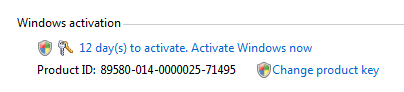 Every Vista DVD has the ability to install any version of Vista without a product key. If you install without a product key, you have a 30 day grace period to enter a key and activate. If you need to extend this period, you may do so by using a built in function of Vista. This may be done 3 times, each time resetting the time left to 30 days.
Press Read more to see how!
Subscribe to:
Posts (Atom)