Windows Tutorials, Howtos, and More!

Advertisements

Thursday, June 22, 2006

How to Reinstall Windows XP Easily

This howto will demonstrate how to keep all of your data while reinstalling Windows without copying it off of your hard drive. This will only work if you have a Windows XP CD or a real source to install it from, NOT a manufactures "Restore CD" which reloads all the junk it came with.
I have seen people on the internet dread reinstalling Windows because it takes so long to backup gigabytes of data and to restore it later! I have found a way that makes it so you do not have to go through the whole hassle! Read on to find out!

This guide will show how to create a Bart PE (Preinstalled Environment) live Windows CD and how to use that CD to make the reinstallation of Windows easier.

You will need a Windows XP CD (The I386 directory some manufactures put on the computers in either C:\ or C:\Windows\ Might work) or installation source to be able to use this guide. You will also need a CD burner and a blank CD-R.

First, download the latest version of Bart PE self-installing package from here and install it to the default directory.
Now launch PE Builder and agree to the prompt. If you know exactly where your installation files are or have a Windows XP CD do not have it automatically search for files, if not let it search for them.
If the program didn't auto-detect the installation files, manually navigate to the directory that I386 folder is in by pressing the ". . ." button. (i.e. for me my I386 folder is C:\Windows\I386 so I would navigate to C:\Windows)
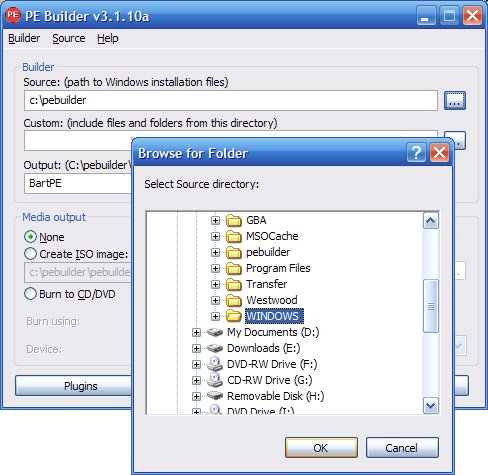
Press Create ISO image and then press Build. Let it create any directories it wants and press agree again.
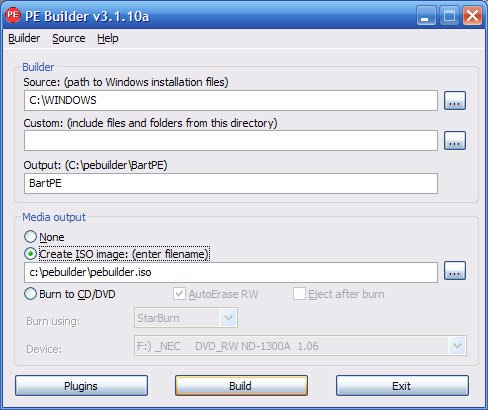
And wait for building to be complete.

Now close PE Builder and burn the created ISO file to a blank CD.

You now have a Windows Live CD capable of helping restore files if Windows crashes or allows you to install a fresh copy of Windows without being troubled with the hassle of backing up your files.

The next part of this howto will show how to boot up Bart PE and prepare your files so they do not get deleted when installing a fresh copy of Windows.

To boot Bart PE, simply put it in your CD drive and restart your computer. Make sure your computer is set to boot from the CD drive or if you have a fairly new computer or motherboard you can bring up a boot menu by pressing either F8 F11 or F12 (depending on your computer) and select the CD drive Bart PE is in.
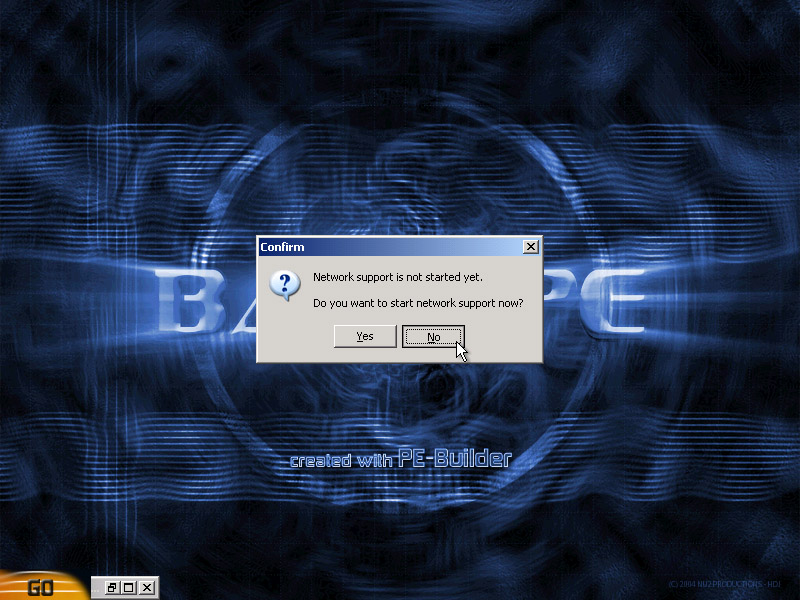
Once it is booted up, it should look like this.

You do not need to setup a network connection so if it asks you press no.
Now you need to move your files to a safe place on the hard drive so they do not get deleted. This is done by using the file manager called A43.
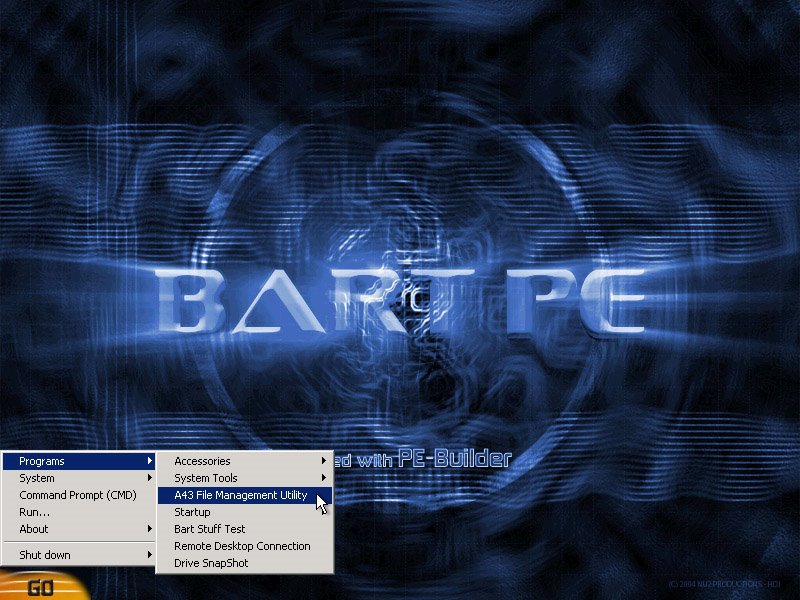
Make a new folder in your C:\ Drive, I called mine BACKUP.

I want to backup my My Documents folder, so I will navigate to C:\Documents and Settings\YOUR USERNAME\ and move My Documents into my BACKUP folder.
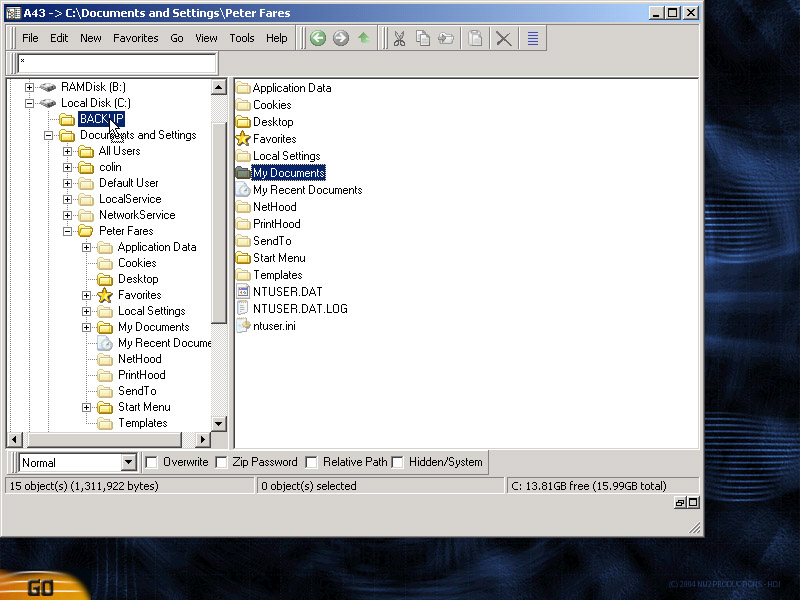
If there are multiple users you may want to backup the other My Documents.
NOTE: My Documents is sometimes called USERNAME's Documents

You may also move other folders into your BACKUP folder, for example I will move my Python24 folder.

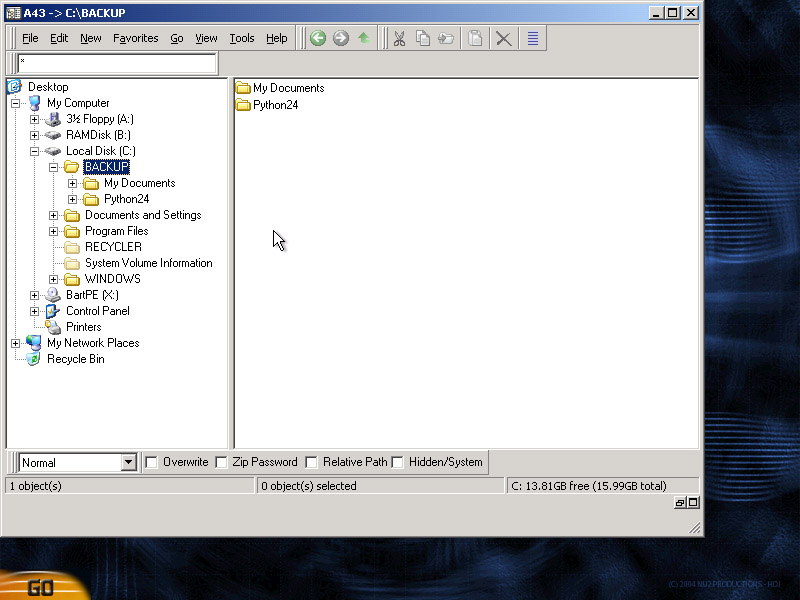
Once you are sure you have moved all the files you want, it is time to delete all folders but the BACKUP folder. There is always Windows, Program Files, Documents and Settings and there may be other folders. You should also delete boot.ini if you only have one operating system installed on your computer. Don't try to delete RECYCLER or System Volume Information.
To delete the extra folders, select them and hold shift then press delete. This will make sure they are not sent to the recycle bin and are deleted for sure.
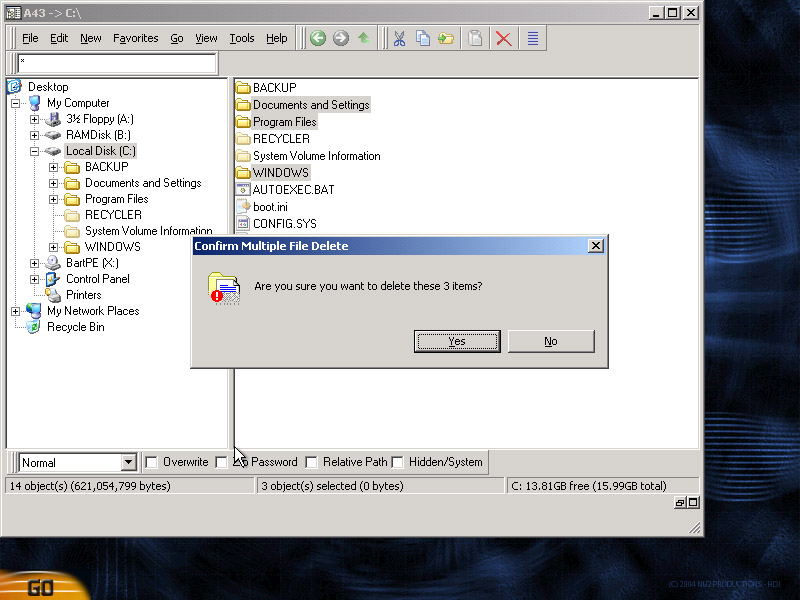
While deleting it will say that some files are read only or are system files, just press yes to all

If there is an error deleting a file and the deleting process ends, you will have to go into the folder that caused the error (like if it was in Windows) and delete folders one by one until you find the one that says it can not be deleted. Just rename it to junk continue deleting all the other folders.
For example, the something in my WINDOWS folder was causing an error, so I went in and deleted things one by one until I got to System32 which caused an error, so I renamed it to System3 so for when I reinstall Windows it does not cause an error.
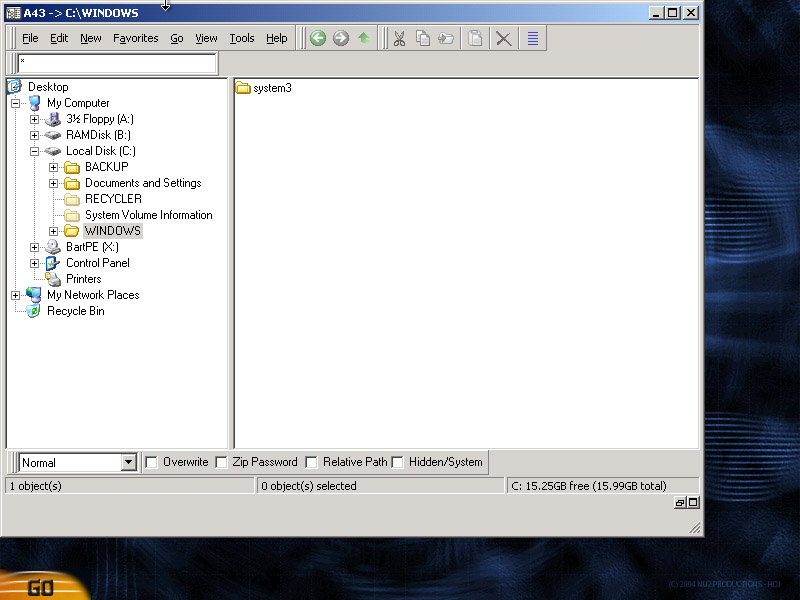
Also the user colin in Documents and Settings was causing an error so I delete all the files I can inside it and rename it to junk.

You can now turn off your computer and proceed to install Windows.

Once installed, you still have all the files you put into your Backup folder. You may now move them to their correct locations.

25 Comments:

  • This post has been removed by a blog administrator.

    By Blogger Schweitzer, at 5:35 AM  

  • the main issue i have with re-installing windows is the fact that all the softwares that i have installed on it will get lost...
    i aint sure if i still hav the installers of all those softwares with me, even if do, i just dont have the time or energy to go thru with updating them all to the current version!
    do you know of any method thru which i can burn an image of the "current windows XP" that i am running with the softwares still installed...
    the reason for reinstalling XP is not any 3rd party software but some issues with XP itself. yes i do have a win XP CD.

    By Blogger MountCleverest, at 2:59 AM  

  • An admirable post, I'd love to do this, but I got stuck with your directions right near the beginning:

    First, download the latest version of Bart PE self-installing package from here and install it to the default directory.
    Now launch PE Builder and agree to the prompt. If you know exactly where your installation files are or have a Windows XP CD do not have it automatically search for files, if not let it search for them.
    If the program didn't auto-detect the installation files, manually navigate to the directory that I386 folder is in by pressing the ". . ." button. (i.e. for me my I386 folder is C:\Windows\I386 so I would navigate to C:\Windows)


    "the default directory" - I have 4 drive partitions, does it matter where Bart gets installed?

    Then, I assume you mean if one has the XP install CD, to have it in the CD drive, but then "do not have it (Bart) automatically search for files"... I'm confused.

    Finally, "manually navigate to the directory that I386 folder is in" - well I just looked on my HD and I have 7 on C and one on G. Five of the seven on C are in the path C:\WINDOWS\system32\ReinstallBackups\ and then inside that,
    0000\DriverFiles\i386
    0001\DriverFiles\i386
    0002\DriverFiles\i386
    0005\DriverFiles\i386
    0007\DriverFiles\i386

    Since I do have the XP CD, this may not matter for me, but what about others trying to point Bart to I386?

    If this comment needs deletion, please email me at tuber at myway.com

    By Blogger Rob, at 3:55 AM  

  • so even though I dont have an original windows xp install cd, I can make one with PE Builder and use that iso to reinstall windows xp?

    By Blogger Matt, at 7:09 AM  

  • This is all well and good, and I am a keen supporter of BartPE having used it to resucertate several virus infected systems. But perhaps we are overlooking the User State Migration Tool (USMT) that Microsoft release awhile back..?

    It's solid, backups everything bar \Program Files and is a whole lot less easier than creating BartPE. Also, BartPE is technically illegal, even though you own a legal copy of XP.. I guess if a copy of BarPE with your CD got into the circuit, you could be legaly liable as it has your product key in there. It's OK for occaisional use and is a life saver IMHO. Microsoft does have its own WinPE which is due to become part of the Vista release cycle - maybe it will end up as a tool for XP recovery

    Rob Atkinson
    http://spaces.mn.com/knowledgebyte

    By Blogger Rob Atkinson, at 2:33 PM  

  • This is all well and good, and I am a keen supporter of BartPE having used it to resuscitate several virus infected systems. But perhaps we are overlooking the User State Migration Tool (USMT) that Microsoft released awhile back..?

    It's solid, backups everything bar \Program Files and is a whole lot easier than creating BartPE. Also, BartPE is technically illegal, even though you own a legal copy of XP.. I guess if a copy of BarPE with your CD got into the circuit, you could be legally liable as it has your product key in there. It's OK for occasional use and is a life saver IMHO. Microsoft does have its own WinPE which is due to become part of the Vista release cycle - maybe it will end up as a tool for XP recovery

    Rob Atkinson
    http://spaces.msn.com/knowledgebyte

    By Blogger Rob Atkinson, at 2:37 PM  

  • What's the big deal? I just upgraded my mobo and had to reinstall Windows XP. It offered to Repair an existing installation (Not the 'R' For Repair option, but later). I said OK, and it did. It uninstalled Windows, reinstalled it, and all my software is still intact. Nice!

    By Blogger Phil, at 6:14 PM  

  • Hi

    This is exactly what I was searching for.
    Thank,s

    Brad
    songs

    By Blogger dehumidifier, at 9:36 AM  

  • Hi...I'm stuck...just wiped the hardrive clean, went perfect...have the 6 set up boot disks for x/p and installed them as directed, went perfect...it called for the xp dvd in d: ...I put it in and it won't read D:...yikes!!!(I can hear D: powerup but it just won't read it...and my keyboard won't allow me to type a prompt...what to do?

    By Blogger flyer, at 7:50 PM  

  • My original CD is Windows XP Home Edition marked "UPGRADE" and includes Service Pack 1. Can this CD be used?

    Thanks!

    By Blogger Brian, at 9:46 AM  

  • yea i have a problem i find my i386 folder and mine is loctaed in driver cache i then do what it says in the manual u writ but when i get to the part where it says create ISO image then i click build an error message comes up saying (C:/WINDOWS/Driver Cache/i386/setupldr.bin) it says that it cannot find that file. im stuck here so can anyone try to help me thanks

    By Blogger daniel.s, at 3:54 PM  

  • could you help me ?
    i cannt boot from the cd
    it just boots windows and thats it
    i dont no what to do
    please help

    By Blogger icecibe, at 9:19 AM  

  • nice post... i update one tip with your blog.... keep it up....

    by
    computer internet technology

    By Blogger Web designer india, at 11:31 PM  

  • i like your blog ....

    By Blogger bollywood girls, at 11:19 PM  

  • By Blogger seoaddlink, at 11:43 PM  

  • Nice post, thanks for explaining using snapshots...

    reinstall windows xp

    By Blogger Sweety, at 3:38 AM  

  • Thats a very interesting post. I have been inspired. Thanks. Web Designer

    By Blogger dpanupam, at 11:30 PM  

  • I have completed the Part crete the BartPE Disk but I am not ready to delete all my windows files without knowing if this will work.

    I didn ot realize that just by booting to BartsPE I was going ahead with the reinstall. I moved my files but did not delete windows files and now I have a mess.

    The instructions provided here say to reinstall XP but do not explain how that is done.

    Ihave a USB device but I do not know where to go from here.

    By Blogger SMA, at 8:09 AM  

  • 1。那混合物是更缓慢的 ... 但是 Lexus 的即将到来混合版本 ' 将是比气体气体更快的唯一的版本如好地有多马力。不要自夸速度,但是我被吸引轮流开送行为 90,是警察给我一次休息。
    2。那不是很
    ... 只是通过在城市乘公交车往返我储蓄过来 $ 5000/yr 与我的以前的汽车,吉普车切诺基相比。超过 5 年,会是 $ 更不用说会进一步增强我的储蓄的最近的比率远足的 20K。这样除非你是在你的父母的地产上吸的一个浪费的儿子,你的声明是一束公牛。

    By Blogger milf, at 2:33 PM  

  • 3. 45 (90 r/t)
    45mpg 天是 2 我的车上> 8 加>>比。那每天是 6 >仑的一笔>蓄, 120 月, 1440 每年者 5040 (根 3.5 元/) ... 加上它发表 1/10th CO2。多愚蠢是它不要骑一个,去算进今天和年龄。
    4.缺少了解 ... 是真的,实际上我个人这样那样喜欢它我可能享受所有鼓励;税,合伙用车,免费停车米, prius 业主之间的秘密的信号,等等;这样自私地说那我真地在那里在享受在所有气体汽车业主上的所有权那没有一个想法多少我这辆汽车有的嬉戏。我 junked 我的 SL,郊区对我的 Prius ... 你应该也。

    By Blogger milf, at 2:34 PM  

  • okay how can i reinstall the windows?
    and when i bot up the disk it loads some caldera something and i can type there some stupid comands there and thats it.what should i do so it would look the same as in your tutorial when its all booted up?

    By Blogger girts.bricis, at 6:16 AM  

  • okay how can i reinstall the windows?
    and when i bot up the disk it loads some caldera something and i can type there some stupid comands there and thats it.what should i do so it would look the same as in your tutorial when its all booted up?

    By Blogger girts.bricis, at 6:17 AM  

  • good work mate....


    cirrogram

    By Blogger website, at 1:41 AM  

  • Pretty impressed with how you have explained everything step by step. Looked pretty easy for me...But when i tried it myself i was stuck at a point where the PE Builder software was popping out this error ------>>"cannot find" (C:/WINDOWS/Driver Cache/i386/setupldr.bin)<<---- i am stuck here & have no idea what should i do to proceed. Please help.

    By Blogger Muzically, at 1:19 AM  

  • Pretty impressed with how you have explained everything step by step. Looked pretty easy for me...But when i tried it myself i was stuck at a point where the PE Builder software was popping out this error ------>>"cannot find" (C:/WINDOWS/Driver Cache/i386/setupldr.bin)<<---- i am stuck here & have no idea what should i do to proceed. Please help.

    By Blogger Muzically, at 1:20 AM  

Post a Comment

<< Home